01
Create
Draw precise outlines or turn local artwork into editable Bézier curves.
Typelure is a free online font editor with precise Bézier tools and a clear completion path. Draw glyphs, reuse linked forms, trace artwork, proof words, and export TTF or WOFF2 without uploading your font.
Plan the characters your font needsYour active project stays on this device.
Trace local artwork into editable curves.
Draw, select, bend, simplify, and measure.
Import TTF, OTF, or WOFF; export TTF or WOFF2.
One connected workflow
Start with guidance, reveal deeper controls as you need them, and keep progress in view from first outline to final file.
Draw precise outlines or turn local artwork into editable Bézier curves.
Add missing glyph slots and build supported accents from finished letters in reversible batches.
Tune curves, guides, spacing, bearings, and metadata in context.
Proof real words and work through actionable outline checks.
Compile locally to desktop and web-ready font files.
Reproducible sample project
Typelure Primer is a deliberately limited eight-codepoint prototype. Its editable source, linked component, measured spacing, readiness results, resolved outlines, TTF, and WOFF2 all come from one versioned project.
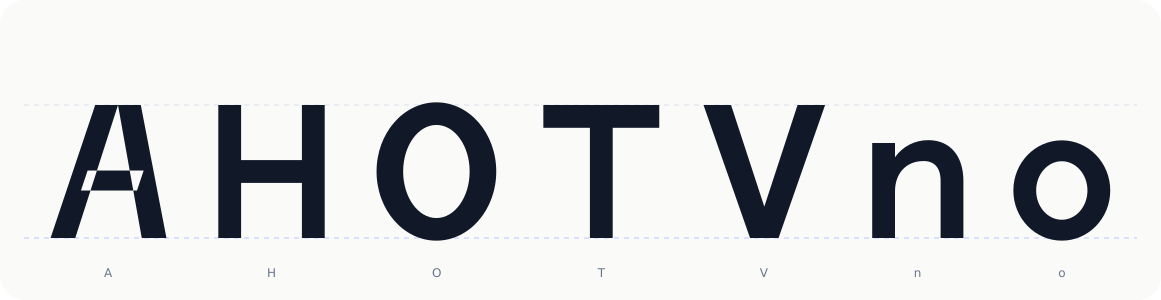
This demonstrates only the declared prototype recipe. It does not claim general language coverage, kerning, hinting, optical certification, or desktop-app testing.
Design once, reuse everywhere
Turn dots, accents, terminals, and repeated forms into linked components. Edit the main form once to update every instance, or detach one glyph when it needs an optical exception.
Completion cockpit
Typelure turns font completion into an understandable queue: character coverage, supported outline checks, naming, metrics, proofing, and export readiness in one place.
Basic Latin web font
3 tasks remain
Keep going—you are close.
Draw @, & and %.
No issues found in supported checks. Manual proofing and exported-file testing are still required.
No issues found in supported checks.
Review punctuation and spacing.
Beginner-friendly. Precision-capable.
Start with clear actions and learn the craft in context. When precision matters, the underlying vector and metric controls are right there.
Guided mode
Friendly empty states, visible keyboard hints, a next-task queue, and plain-language checks keep first-time type designers moving.
Precision mode
Edit cubic and quadratic outlines, transform selections, tune bearings and vertical metrics, inspect Unicode mappings, and work with shortcuts.
Make the font, not the workflow
Typelure runs in your browser, keeps the active project local, and gives every stage of font creation a clear place.
Free to use · no account required